Top 10 CCNA Exam Questions (2026)

This article will help students study effectively for the CCNA certification exam. Cisco publishes a roadmap every 12 months to add or remove exam topics based on relevance and importance. There is also an on-going shift that affects how many questions you will get for individual topics. For example, IP connectivity domain with 25% of exam points could have most of the questions on only two topics.

Knowledge DomainScoring
Network Fundamentals20%
Network Access20%
IP Connectivity25%
IP Services10%
Security Fundamentals15%
Automation and Programmability10%

It is crucial for students to create a study plan based on coverage of all topics and spend more time on key topics. Top 10 exam topics are required to answer questions in multiple knowledge domains. Exam points are weighted higher for core topics and that will affect your test score.

1. Subnetting

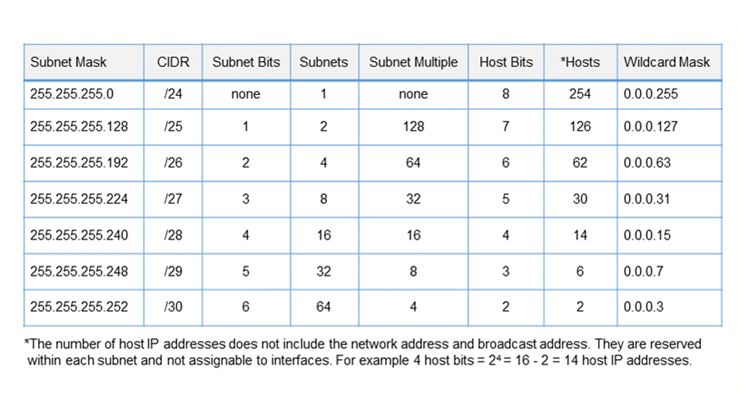
Students cannot pass the CCNA exam without solid subnetting skills. CCNA is a timed exam and accuracy is important as well. Subnetting extends to multiple topics and knowledge domains. For example, subnetting is required for IP interface addressing and route selection. Subnetting will follow you to the CCNP exam as well for topics such as route maps. There are also wildcard masks used for advertising OSPF routes and access control lists (ACLs). The wildcard mask is an inverted subnet mask for advertising or filtering classful and classless routes. Network address translation (NAT) allows host internet access based on ACL wildcard masks.
2. Route Selection

There is a lot of anecdotal evidence that students must know how to analyze routing tables for the CCNA exam. This topic will require knowledge of route selection and subnetting to answer questions. There is an algorithm that is used to select routes to install in the routing table. Routers will use the same algorithm to select routes already installed in the routing table for making forwarding decisions. Route selection is based on administrative distance, metrics, and longest prefix match subtopics.

Subnetting skills are required for longest prefix match rule to calculate address range. You will get output from a routing table and asked what route is selected to a specific network or what route is installed. What happens when a network interface is down and how does that affect selection of a backup route? There are also mandatory questions on the configuration of IPv4/IPv6 default and static routes that include route selection.

3. Switch Interconnects

Switching protocols is another core topic and not surprising since most network devices are switches. Consider data centers where most network traffic is between servers that connect via multiple switch types. There is much less traffic that traverses the internet by comparison. You can count on a significant number of trunking and Etherchannel questions that include labs. Switch connectivity also includes subtopics such as switch port settings, VLANs, and spanning tree protocol. LACP Etherchannel is often configured with trunk interfaces to connect switches with Layer 2 and Layer 3 port channels. Wireless controllers are prevalent in the data center and also connect to switches.

4. Wireless Protocols and RF Concepts

Cisco has added a lot more wireless network questions to the CCNA exam recently. In fact, students will have to know everything from RF concepts to wireless security and advanced controller settings from GUI. It is important to study the various features available to lower latency and enable faster roaming. Know how to navigate the controller GUI to enable security features along with authentication and encryption protocols. There are different AP modes such as FlexConnect and CAPWAP tunnel communication to the controller. Consider as well how DHCP and DNS traffic is managed and the various controller interfaces. You should also know how communication works between controller, access point, and clients.

5. Open Shortest Path First (OSPF)

OSPF is an open standard IP routing protocol that is easily the most popular IGP within the enterprise network. OSPF is a core topic with questions on operation, single-area configuration, and how to verify connectivity. You will also get questions based on the output of a show command and determine how a router is configured. Some key topics include router ID selection, DR/BDR election, OSPF network type, and metric calculation. OSPF uses wildcard masks to advertise subnets to neighbors. You should also know how to configure OSPF using the interface method. Make notes on timer interface settings, passive interfaces, and default priority.

OSPFv2 is officially the only dynamic routing protocol on the CCNA syllabus however that isn’t entirely accurate. Since route selection involves administrative distance (AD) you should know the AD values for all default, static and dynamic routing protocols. It is recommended to include OSPF and EIGRP metrics in your study plan as well. Practice hands-on with this OSPF configuration lab.

6. Access Control Lists (ACL)

Some of the most difficult topics on the CCNA exam include access control lists and subnetting. CCNA will have concept and configuration questions pertaining to access control lists. For example, select the ACL to deny specific traffic classes for a range of subnets and enable logging. It is important to know how to analyze ACLs and determine what is being filtered.

Study application port numbers, IP protocol numbers, and how to configure IPv6 access control lists. There are standard, extended, and extended named ACL questions on the exam. Learn where to apply ACLs and how that affects filtering and performance. Students should also study local account authentication options and device passwords. Learn how to secure your network with this Cisco ACL configuration guide.

7. Cisco IOS Commands

Students should make a cheat sheet for all configuration topics and associated show commands. Read the official CCNA syllabus and note every instance where configure and verify keywords are mentioned. Include protocols such as DNS, DHCP, and HSRP as well where configure is not specified. There are performance-based labs that will require you to configure and verify multiple protocols. For example, OSPF, static routes, Etherchannel, trunking, NAT, and DHCP snooping. Know how to analyze the output of show commands to determine configuration settings for a device as well.

Cisco Performance-Based Simulation Labs (2025)

8. IPv6 Addressing

This topic has a reputation for lowering the score of CCNA test-takers. IPv6 addressing has been implemented as almost a second level of addressing within the enterprise. As a result, some students do not have the experience or spend enough time studying. The questions range from addressing types, configuration of static routes, and addressing methods. Know how to configure SLAAC, EUI-64 interface format, and DHCPv6. Distinguish between different prefix lengths and number of hosts for LAN/WAN connectivity. There are also differences between IPv4 and IPv6 network communication protocols.

9. DHCP / DNS Services

DHCP and DNS services extend to different addressing platforms and protocols. They are core network services and the CCNA exam will require basic knowledge. You should know how DHCP communicates with clients and how to configure an IOS server. The same concepts will apply to host-based DHCP for client addressing along with DHCP relay.

As with most network protocols there are port numbers, message types, and show commands as well. Study DNS protocol operation, services, and record types for IPv4 and IPv6. Distinguish between client-based DNS services and Cisco-based DNS configuration. It is important to know both host commands and IOS commands for all IP services listed with the syllabus. Since TCP and UDP transport is so crucial to network communication make sure to know the differences.

10. Software-Defined Networking (SDN)

SDN topic is comprised mostly of architecture and REST-based APIs questions. For example you should study the operational planes and mapped network services. There is also SDN controller operation, functions, and communication with physical devices. That includes northbound and southbound interfaces. You will get questions on REST API operation, authentication methods, and HTTP headers. The authentication methods include basic, JWT, OAuth2, and API keys. Some overlap is starting to exist between networking and DevOps.

If you’re just starting, check out this CCNA Certification FAQs

Visio Network Diagrams: CCNA, CCNP & CCIE

Visio is an essential drawing tool that enables network engineers to create physical and logical drawings. Visio includes templates, standard shapes, and stencils for devices such as routers, switches, servers, firewalls, and host endpoints. In addition there are connectors to represent network topology. Visio is key to creating and managing your network documentation.

Advantages of Visio

There is an old adage that a picture is worth a thousand words. This means that you can convey much more information faster and easier with an image than text. Visio is really an essential tool for communicating ideas effectively to multiple audiences. In fact, written communication is among the most in-demand soft skills that employers require today.

    • Troubleshooting: Visio allows network engineers to create detailed network diagrams that document both physical and logical layout of the network. This includes device hardware, topologies, addressing, and protocols. Visio drawings provide a summary reference with key information when diagnosing network issues, root cause analysis, and data flows.
    • Implementation: Maintaining up-to-date Visio diagrams is crucial since you are often integrating new equipment into an existing infrastructure. This helps identify rack space, available ports, protocol configuration, IP address blocks, and naming conventions.
    • Knowledge Transfer: Visio drawings are essential to training and communication between multiple groups within an enterprise. For example, new employees and contractors rely on network drawings to “learn” the design and configuration of a network. It also enables transition to existing engineers when an employee suddenly quits or goes on vacation.
    • Presentations: Visio enables network engineers to convey ideas and concepts to different types of audiences. For example help desk support, implementation engineers, and third party vendors. There are also powerpoint icons for presentation to management-level audience. You would have versions of each drawing adapted to your audience and based on proper security compliance.

Layer 2 Network Drawing

The purpose of a network drawing is to document network design and configuration of your current network. This is primarily for troubleshooting, support, implementation, knowledge transfer, and presentation purposes.

There are both physical and logical network drawings created to fully document your current network. Physical drawings represent Layer 1 connectivity for devices implemented to data center and wiring closets. By contrast, logical drawings represent Layer 2 and Layer 3 networking features. They also convey how data traffic flows and communication between network devices.

Layer 2 logical drawings are comprised of only switches and do not include routers. There is no L3 addressing except for the device management IP address. The connections between network devices represent the logical topology that could span multiple racks or even locations. There is also L2 addressing that include VLANs and MAC addressing where relevant.

    • Switches, access points, and wireless controllers
    • Topology connections (interface labels)
    • Device hostname
    • Management IP address
    • VLANs and MAC addressing
    • Trunking and Etherchannel links
    • Spanning tree information
    • Network servers (DNS, DHCP, TFTP etc)
    • Title block with location, date, contact

Trunking and EtherChannel links should be included on your drawing. Data center drawings should document spanning tree root/secondary bridges. Wireless access points and controllers are also added unless you have a sizable wireless network. In that case you would create a separate drawing for wireless connectivity. Typically you would create a single drawing for branch offices unless you have multi-floor building for example.

Layer 3 Network Drawing

Layer 3 network drawings are comprised of routers, L3 switches, and firewalls devices. There is also subnet addressing, loopbacks, and management IP address. You could also include VLANs associated with subnets particularly for L3 switch links. Routing protocol design is represented along with redundant routing paths, VRFs, and FHRP (default gateway). Add your ISP connection with telco circuit ID, link speed, and WAN protocol.

    • Routers, L3 switches, and firewalls
    • Topology connections (interface labels)
    • Device hostname
    • Management IP address
    • VLANs and SVIs
    • Network subnets and loopbacks
    • Port channels (L3)
    • Routing protocol design (areas etc.)
    • FHRP redundancy
    • WAN link speed, ISP, and circuit id
    • Data flow lines
    • Network servers (DNS, DHCP, TFTP)
    • Title block with location, date, contact

The following network drawing represents a data center topology with full redundancy. As mentioned there is often a single integrated drawing for branch offices and a hyperlink to the upstream data center switch connection. Consider a hierarchical approach to network drawings with links from data center master drawing to branch offices and cloud.

Layer 1 Physical Drawing

Visio physical drawings represent Layer 1 connectivity with the option of rack or standard topology drawings. The figure shown is based on Cisco device stencils with switch chassis, supervisor engine, line cards, and power supplies. There is also wireless access points, fixed module switches, and associated cabling media. This drawing type is useful for implementation and troubleshooting.

You have to “build” each network device that has a modular architecture. Create design templates within Visio for faster drawings and minimize duplication. For example, you could create templates for branch office, cloud, and internet DMZ. This applies to both physical and logical drawings.

Microsoft Visio Network Diagrams – CCNA, CCNP & CCIE

Network Documentation Tips and Tricks

The following is a list of network documentation tips and tricks for network engineers. Most of the recommendations are added to Cisco configuration scripts with examples for reference.

Interface Description: The description command permits adding a description to a network interface.

switch(config-if)#description WAN primary connection to ISP.

ACL Remark: The remark command is added to explain the purpose of an ACL.

switch(config-ext-nacl)#access-list 100 remark ACL permits FTP traffic to any destination.

Static Route Name: The name command allows you to add a description to a static route.

switch(config)#ip route 172.16.1.0 255.255.255.0 192.168.1.1 name static-route-to-ISP

VLAN Name: The name command allows you to configure a descriptive name for a VLAN.

switch(config-vlan)#name wireless

SNMP Location: The location command allows you to specify location of a network device.

switch(config)#snmp-server location DC-1 Rack A-27

SNMP Contact: The contact command allows you to add a mobile phone number, email, and support contact name.

switch(config)#snmp-server contact 1-800-network (dc@netops.com)

Configuration Script Comments: TFTP server preserves any comments added to the running configuration script when preceded with an exclamation point (!). Cisco will strip out all comments when it is saved to NVRAM.

Data Rack Pictures: Take a picture of the data center rack after any implementation that includes both front and rear view. This also applies to wiring closets and then convert to PNG format. Include a hyperlink from your rack drawing to the image file for reference.

Baseline Operational State: Create a python script with ChatGPT to snapshot the operational state of devices as a reference point. Common IOS commands include show run, show ip route, show cdp neighbors, show interfaces trunk, and show ip ospf neighbor.

L2 / L3 Drawings: Avoid clutter with separate physical and logical drawings for complex data center topologies. Include rack drawings for data center and wiring closets.

Document Version Control: Share documents from a centralized intranet location where file locking and version control is enabled. Permit access to drawings from the internet so they are available to network engineers for troubleshooting and add security.

Confluence Updates: Update any existing network drawings that are affected on confluence for example.

Proper network documentation is essential to managing network infrastructure. It is also key to effective communication with other audiences and groups within the enterprise. Hyperlinks from devices to Infoblox, scripts, or associated drawings for example enable quick access to network addressing and configuration.